CRM2015 Update 1 loads form scripts in seperate IFrame called ClientApiWrapper. I have seen a couple of posts in CRM forums asking how to interact with the IFrame from the form scripts and vice versa. The usual route is “window.parent”, but I tried to do this using sessionStorage and it is doing what I want.
Form Script
(function(){
	var RYR = window.RYR || {};

	window.addEventListener('storage', function(e) {
		if(e.key.split(':')[0] === 'child') {
			var functionToCall = e.key.split(':')[1];
			var sessionStoredValue = JSON.parse(e.newValue);
			RYR[functionToCall]
			.apply(null,
			Object.keys(sessionStoredValue)
			.map(function(d){
				return sessionStoredValue[d];
			}));
			sessionStorage.removeItem(e.key);
		}
	});

	RYR.onSave = function(){
	};

	RYR.setFieldEditability = function(fieldName, isDisabled){
		Xrm.Page.getControl(fieldName).setDisabled(isDisabled);
	};

	RYR.setFieldVisibility = function(fieldName, isVisible){
		Xrm.Page.getControl(fieldName).setVisible(isVisible)
	};

	RYR.onLoad = function(){
		//temp workaround: iframe storage eventhandler takes some time to attach
		setTimeout(function(){ sessionStorage.setItem('parent', 'Form Load Event..'); }, 2000);
		Xrm.Page.getAttribute('ryr_name').addOnChange(function(){
			sessionStorage.setItem('parent', 'Name field changed..');
		});
	};

	window.RYR = RYR;
})();
HTML Webresource embedded as form IFrame
<!DOCTYPE html>
<html lang="en">
<head>
	<meta charset="UTF-8">
	<title>Form IFrame</title>
	<script>
	window.addEventListener('storage', function(e) {
		if(e.key === 'parent') {
			document.getElementById('messageFromParent').textContent = 'Parent says "' + e.newValue+'"';
			sessionStorage.removeItem(e.key);
		}
	});

	document.addEventListener('DOMContentLoaded' , function() {
		document.getElementById("buttons").addEventListener("click", function(e){
			switch(e.target.id){
				case "enableField":
					sessionStorage.setItem('child:setFieldEditability', JSON.stringify({fieldName: document.getElementById("crmFieldName").value, disabled: false}));
					break;
				case "disableField":
					sessionStorage.setItem('child:setFieldEditability', JSON.stringify({fieldName: document.getElementById("crmFieldName").value, disabled: true}));
					break;
				case "hideField":
					sessionStorage.setItem('child:setFieldVisibility', JSON.stringify({fieldName: document.getElementById("crmFieldName").value, isVisible: false}));
					break;
				case "showField":
					sessionStorage.setItem('child:setFieldVisibility', JSON.stringify({fieldName: document.getElementById("crmFieldName").value, isVisible: true}));
					break;
			}
		});
	});
	</script>
</head>
<body>
<input type="text" id="crmFieldName">


<div id="buttons">
<button id="enableField">Enable Field</button>
<button id="disableField">Disable Field</button>
<button id="hideField">Hide Field</button>
<button id="showField">Show Field</button>
</div>


</body>
</html>
There are event listeners on both the form script as well as the IFrame. The IFrame puts values in keys in this form: “child:{function name on form script}”. The form script uses just one key: parent.
Screenshots
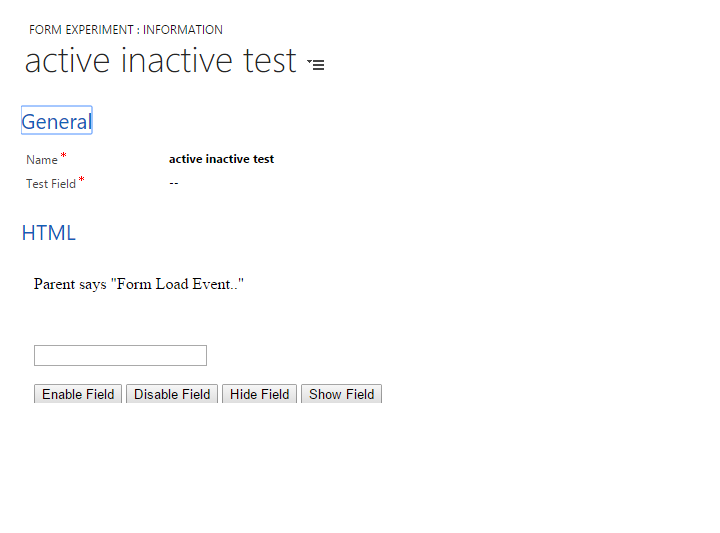
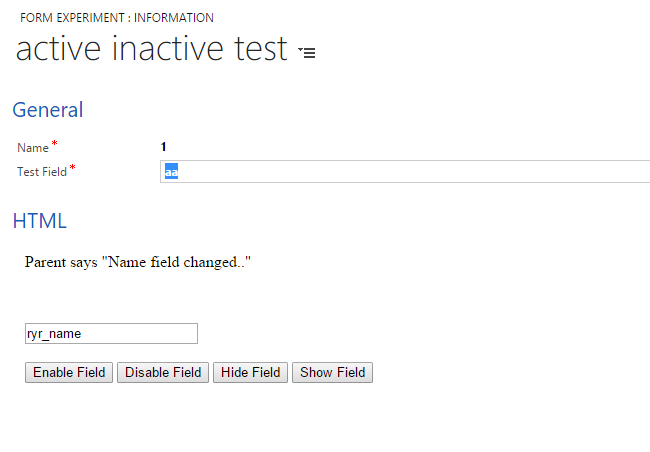
With this technique, the form script doesn’t have to directly manipulate anything on the embedded IFrame or vice versa. In my example, I have the IFrame storing JSON to the sessionStore. This is retrieved by the event handler to call the correct function in the form script. The parent form script simply stores a string to the session store and this is displayed in the IFrame. This has to be changed if the requirements are different.
Reference: https://developer.mozilla.org/en/docs/Web/API/Window/sessionStorage
 Dreaming in CRM & Power Platform
[…] Using sessionStorage to interact with IFrame in CRM Forms […]
[…] is similar to my earlier post (https://dreamingincrm.com/2015/10/27/using-sessionstorage-to-interact-with-iframe-in-crm-forms/) that discussed using sessionStorage events to interact with IFrame and the IFrame to interact with […]